

This chapter is for an estate that the Oracle MySQL plug-in (oracle.mysql.omys) monitors today. It explains what
a migration is, walks through the seven modes of the onboarding script that performs it, and lists the places
where the two plug-ins encode the same measurement differently, so that a threshold or a report you carry over
keeps its meaning.
Where to find it: the script is a download from this site; it runs on the OMS host with EM CLI. The replacement targets appear under Targets, like any other, as they are created.
In this page: What the migration is · How the script moves an estate · Before you start · Step 1 Export · Step 2 Review the CSV · Step 3 Apply · Step 4 Verify · Step 5 Coexist · Step 6 Associate the compliance standards · Step 7 Retire the sources · What the script prints · Files and secrets · Convention differences · Threshold porting worksheet
What the migration is
Section titled “What the migration is”Moving from oracle.mysql.omys to ip.em.xmys is a re-registration. Each MySQL server, cluster or ClusterSet
that the Oracle plug-in monitors gets a new target of the new plug-in’s type, with the same connection details.
Nothing is upgraded in place, and the old target is not touched until you delete it.
The source and the replacement coexist for as long as you need. Both plug-ins monitor the same server at the same time, so your change process decides when the old target goes.
Moving from the Open Beta plug-in, ip.em.xmyb, to ip.em.xmys works the same way.
How the script moves an estate
Section titled “How the script moves an estate”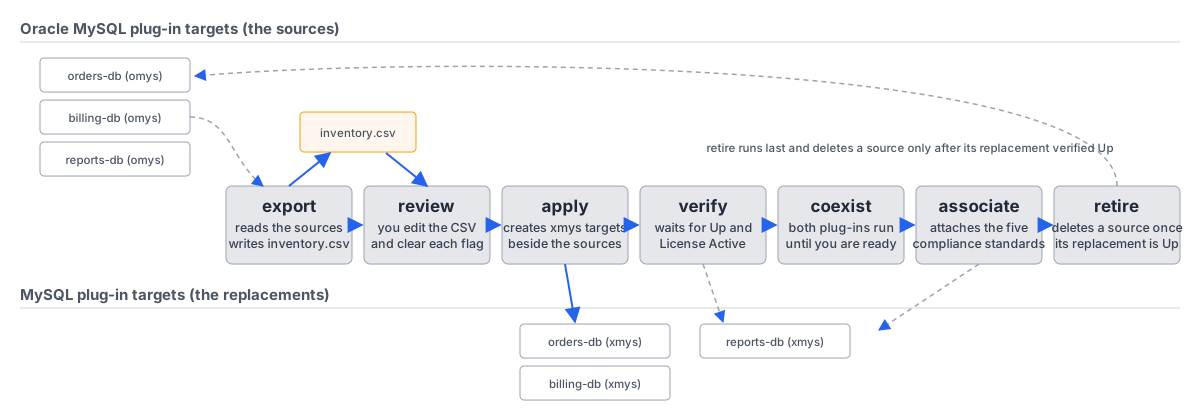
mysql-onboard.sh (download) drives
the whole migration from the OMS host with standard EM CLI. One CSV, inventory.csv, carries the estate from
mode to mode: export writes it, you review it, and every later mode reads it.
| Mode | What it does | Changes EM? |
|---|---|---|
export | reads the source targets and writes one CSV row per target | no |
| review | you edit the CSV and clear every flag | no |
apply | creates the ip.em.xmys targets, or re-pushes properties to ones that exist | yes |
verify | waits for each new target to report Up and License Active | no |
| coexist | both plug-ins monitor; thresholds and reports are ported | no |
associate | attaches the five shipped compliance standards to the new targets | yes |
retire | deletes each source whose replacement verified Up | yes |
Before you start
Section titled “Before you start”- An EM CLI session on the OMS host:
emcli login -username=<em user>. - MySQL Connector/J in
<agentStateDir>/ip_plugin/xmys/lib/on every agent that will monitor a migrated target (guide 2.9). A target created on an agent without the driver reports the driver message instead of data until the jar is there. - A GA license key. The Oracle plug-in has no key, and a key from another plug-in is refused as
Wrong Plug-in. - A Linux agent for every target. The plug-in ships a Linux agent side only.
- The monitoring account from guide 2.4 (
em_monitoring) and its password. Neither the user name nor the password may contain;or:(see Step 3).
Step 1: Export
Section titled “Step 1: Export”emcli login -username=<em user>mysql-onboard.sh export --out inventory.csv --source omysexport reads every target of the Oracle plug-in and writes one row per target. new_name is prefilled with
the source name and agent_host with the source’s agent. Passwords are never written to the CSV.
For Open Beta targets use --source beta, or --source all for both kinds.
--force overwrites an existing --out file. The file is created owner-only (mode 600) because it can carry
license keys once you fill them in.
Done when the log reads export: <n> rows written to inventory.csv and the row count matches the number of
source targets you expect.
Step 2: Review the CSV
Section titled “Step 2: Review the CSV”Open inventory.csv and work through it row by row. The columns are:
source_type,source_name,new_name,target_type,agent_host,host,port,socket,use_secure,kerberos_config,license_key,username,password,ts_dir,ts_type,notesoracle_omys_database,orders-db,orders-db,ip_mysql_database,agent01.example.com,10.0.0.21,3306,,required,,<license key>,em_monitoring,,,,oracle_omys_cluster,orders-cluster,orders-cluster,ip_mysql_cluster,agent01.example.com,"10.0.0.30,10.0.0.31,10.0.0.32",3306,,required,,,em_monitoring,,,,LICENSE: no key this plug-in acceptsEvery row that needs a decision carries a flag in notes. apply refuses the row until you resolve the flag
and delete it.
| Flag | Meaning | What to do |
|---|---|---|
KERBEROS: … | the source set a KDC and realm; the new plug-in reads only a krb5.conf | put the path to a krb5.conf on the agent host in kerberos_config |
LICENSE: … | the source has no key this plug-in accepts | paste the GA key into license_key |
AGENT: Windows agent | the plug-in ships a Linux agent side only | set agent_host to a Linux agent that reaches the server. If the replacement target already exists, emcli delete_target it first and run apply again: modify_target cannot move a target between agents |
TLS: source uses <mode>/truststore | the source uses verify_ca or verify_identity, or carries a truststore path, and this release defers those modes and the client truststore credentials (guide 2.5, 4.1) | set use_secure to required (or disabled) and clear ts_dir and ts_type. The exported values are left for you to see |
STATUS: source target is Down | informational | migrate anyway, or fix the source first |
NAME: … | informational | rename in new_name if you like |
DRLAG: source sets dr_max_lag=<n> | the source ClusterSet carries a DR maximum tolerated GTID lag and the CSV has no column for it | informational; apply does not block on it. After apply, set DR Max Tolerated GTID Lag (transactions) (ip_mysql_clusterset_dr_max_lag) on the new ClusterSet target to the same value, or the DR readiness gate applies its default |
Three columns have rules of their own:
use_secureacceptsdisabledandrequiredonly.verify_caandverify_identityare reserved in the CSV schema and rejected in this release, as is any value ints_dirorts_type, because the client truststore credentials those modes depend on are deferred (guide 2.5, 4.1). Userequiredwhere you need an encrypted session.usernameandpasswordare per row. Leaveusernameempty on rows that use the default you pass as--username, and leavepasswordempty on rows that use the default password from the environment variable.license_keyholds the GA key for database targets. Cluster and ClusterSet targets are containers and carry no key.username,password,--usernameand$MYSQL_MON_PWmay not contain;or:. Theemcli-credentialsoption has no separator override, so either character corrupts every row it reaches; the script refuses the value. Use a monitoring password without those two characters. A later release may lift this:emcliexposes amonitoring_credsseparator name thatadd_targetmay accept, which a follow-up task will establish.
Done when no row carries a flag in notes, and every database row has a user name and a key.
Step 3: Apply
Section titled “Step 3: Apply”MYSQL_MON_PW='…' mysql-onboard.sh apply --csv inventory.csv --username em_monitoring --dry-runMYSQL_MON_PW='…' mysql-onboard.sh apply --csv inventory.csv --username em_monitoringWith --dry-run, apply prints every emcli add_target it would run, with passwords redacted, and writes
nothing. Without it, apply creates the targets. The new targets start collecting the moment they are created.
--username USER is the default for rows whose username cell is empty. --password-env VAR names the
environment variable that holds the default password; the default is MYSQL_MON_PW. None of username,
password, --username or that variable may contain ; or :. EM CLI’s -credentials option has no
separator override, so either character silently corrupts every row it reaches.
Running apply again is safe. A target that exists gets its properties re-pushed with -on_agent. What a second
run cannot do is move a target to a different agent, because modify_target has no option for it. For a changed
agent_host on a target that exists, delete the target first and run apply again:
emcli delete_target -name=<new_name> -type=<target_type>Done when the summary line reads SUMMARY apply: … failed=0.
Step 4: Verify
Section titled “Step 4: Verify”mysql-onboard.sh verify --csv inventory.csvverify waits for each target to report Up and, for database targets, for the License metric to read
Active, then prints a table with one row per target.
--timeout SECONDS (default 1200) is per target, not for the run. The License metric collects every 15 minutes, so a freshly created target can take up to a quarter of an hour
to turn Active even when everything about it is right. A CSV with N targets that never come Up takes up to N times the timeout in total. To see the table
without waiting, run one row with --timeout 1 first.
Done when every row reads PASS. For a FAIL row, fix the cause and run apply again for that row.
Step 5: Coexist
Section titled “Step 5: Coexist”Leave both plug-ins monitoring for as long as your change process needs. During this time, port your thresholds, reports and habits using the convention tables at the end of this chapter. A threshold copied by column name keeps working syntactically; where the encoding differs, it reads the wrong number.
Done when the replacement targets carry the thresholds and compliance standards you rely on, and the reports that read them have been checked against the convention tables.
Step 6: Associate the compliance standards
Section titled “Step 6: Associate the compliance standards”mysql-onboard.sh associate --csv inventory.csvassociate attaches the five shipped compliance standards to every target in the CSV (guide 4.6 lists them).
The console’s compliance framework association is the alternative.
Done when the summary line reads SUMMARY associate: … failed=0.
Step 7: Retire the sources
Section titled “Step 7: Retire the sources”mysql-onboard.sh retire --csv inventory.csvmysql-onboard.sh retire --csv inventory.csv --yesWithout --yes, retire prints the plan. With --yes, it runs emcli delete_target for every source whose
replacement verifies Up. A source whose replacement is not Up is never deleted.
Done when the summary line reads SUMMARY retire: … failed=0 and the Oracle plug-in targets are gone from
All Targets.
What the script prints
Section titled “What the script prints”Every mode writes a log. --log FILE names it; the default is ./mysql-onboard-<mode>-<time>.log.
SUMMARY apply: created=12 skipped=0 updated=2 warned=1 failed=0SUMMARY associate: created=14 skipped=0 updated=0 warned=0 failed=0SUMMARY verify: passed=14 failed=0SUMMARY retire: retired=14 skipped=0 failed=0| Mode | Summary line | Exit status |
|---|---|---|
export | export: <n> rows written to <file> | 0; 2 on a hard error such as an expired EM CLI session or an existing --out file without --force |
apply, associate | SUMMARY <mode>: created= skipped= updated= warned= failed= | the number of failed rows, capped at 255 |
verify | SUMMARY verify: passed=N failed=M | the number of failed rows, capped at 255 |
retire | SUMMARY retire: retired=N skipped=S failed=F | the number of failed rows, capped at 255 |
| any | no summary line | 2: a bad option, a malformed CSV, a rejected row or an unwritable log, where nothing ran |
The cap exists because a process exit status is one byte. An uncapped 256 failures would exit 0. Exit 2 is also the usage and validation code (a bad option, a malformed CSV, a rejected row, an unwritable log), where nothing ran at all. The summary line, printed only when rows ran, tells the two apart.
Files and secrets
Section titled “Files and secrets”- The run log and the CSV that
exportwrites are created owner-only (mode 600), because both can carry license keys. - A CSV with any non-empty
passwordorlicense_keycell must be mode 600.applyrefuses to read one that is group- or world-readable and names which kind of secret it found. - Passwords never appear in the CSV that
exportwrites, in the log, or in--dry-runoutput. applywrites the monitoring password to an owner-only temporary file for the length of eachadd_targetormodify_targetcall and passes it to EM CLI with-input_file, never on the command line. The file is removed as soon as the call returns, with an exit trap as a backstop.- The
signature=half of every license key is masked assignature=<redacted>wherever the script prints or logs a command or an EM CLI reply. The key reaches EM CLI intact, and the CSV keeps the real key so that you can runapplyfrom it again. - One exposure remains, and it belongs to EM CLI:
add_targetandmodify_targethave no file-based form for-properties, so the license key is inline there, visible in that process’s command line for the few seconds of each call to any account with shell access to the OMS host (the same holds for the inlineemcli add_targetin guide 4.3). Runapplyon a host where only administrators have shell access.
Convention differences
Section titled “Convention differences”Both plug-ins monitor the same servers and many columns share names. Where the encoding differs, anything ported by column name (a threshold, a BI report, a mental baseline) keeps working syntactically and reads the wrong number. Every row below was found by running the two plug-ins side by side against the same instances, or during lab verification of a fix.
| Surface | omys | xmys | Porting consequence |
|---|---|---|---|
Statement and query latency columns (avg_latency, max_latency, total_latency, lock_latency) | raw picoseconds, as the sys x$ views emit | microseconds, internally exact (total divided by executions equals avg to 3 decimals) | a threshold ported by name is off by a factor of 1,000,000; re-derive it from the xmys unit labels |
Buffer-pool hit rates (innodb_bp_hit_rate, innodb_bp_young_hit_rate, innodb_bp_not_young_hit_rate) | raw per-mille (1000 / 1000 server form; omys shows 1000 as 100%) | percent to one decimal, normalized in the parser; the PERCENTAGE label and the WARNING 95 / CRITICAL 90 threshold agree with the value | an omys-derived hit-rate threshold such as “alert below 950” divides by 10; xmys ships a working LT 95/90 condition |
innodb_log_capacity_used | echoes the server’s “Log capacity used” line, which always equals capacity (measured on 8.0, 8.4, 9.5 and 9.7, idle and loaded) | derived checkpoint age (LSN minus last checkpoint): near 0 idle, grows under write load | the xmys value answers “how much redo would crash recovery replay”; do not compare the two by name |
| Idle-server absent metrics | varies | absent stays absent (a dash or NULL), never a fabricated 0, across parser, repository and UI | an omys report that coalesces NULL to 0 overstates health when pointed at xmys data; keep NULLs distinct |
Two further points carry over without change:
- Cluster and ClusterSet (Router) Host and (Router) Port take the same comma lists in both plug-ins: equal-length pairs, or one port for all hosts, or one host for all ports. The old values can be re-entered as they are when the new target is registered.
SysStatementBy*on EM 13.5 exposes 400 metric cells against 425 on 24ai for identical data, because 24ai surfaces thedbkey column as ametric_columnrow and 13.5 does not.key_valueis byte-identical and row counts match. A report that counts columns rather than reading named ones differs across OMS versions.
Threshold porting worksheet
Section titled “Threshold porting worksheet”For each threshold you carry over, look the column up in the table above:
| Column | Change |
|---|---|
| statement latency columns | divide by 1,000,000 (picoseconds to microseconds) |
| buffer-pool hit rates | divide by 10 (per-mille to percent) |
innodb_log_capacity_used | a different quantity; not ported |
| reports that coalesce NULL | keep NULLs distinct |
| everything else | ports by name |