

This chapter lists the default thresholds the plug-in ships and how to change them. Topics: 7.1 Default thresholds · 7.2 Changing thresholds
7.1 Default thresholds
Section titled “7.1 Default thresholds”The plug-in ships 22 default metric thresholds, listed below, plus 3 availability conditions (the Status column of each target type’s Response metric, which drive the target’s Up/Down state and are not shown here).
| Target type | Metric group | Column | Operator | Warning | Critical | Consecutive occurrences |
|---|---|---|---|---|---|---|
ip_mysql_database | ReplicationReplicaActivity | seconds_behind_source | > | 30 | 300 | 1 |
ip_mysql_database | ReplicationReplicaActivity | replica_io_running | = | No | 1 | |
ip_mysql_database | ReplicationReplicaActivity | replica_sql_running | = | false | 1 | |
ip_mysql_database | InnodbBufferPool | innodb_bp_hit_rate | < | 95 | 90 | 1 |
ip_mysql_database | InnodbTransaction | innodb_trx_history_list_length | > | 100000 | 1000000 | 1 |
ip_mysql_database | ConnectionActivity | aborted_connects_delta | > | 10 | 50 | 1 |
ip_mysql_database | ThreadsActivity | connection_saturation_pct | > | 80 | 95 | 1 |
ip_mysql_database | TableActivity | disk_tmp_table_pct | > | 25 | 50 | 1 |
ip_mysql_database | SysSchemaStatus | sys_supported | < | 1 | 1 | |
ip_mysql_database | BackupStatus | hours_since_last_success | > | 26 | 50 | 1 |
ip_mysql_database | BackupStatus | last_backup_failed | > | 0 | 1 | |
ip_mysql_database | BackupStatus | never_succeeded | > | 0 | 1 | |
ip_mysql_database | WaitProfile | avg_wait_us | > | 1000000 | 5000000 | 3 |
ip_mysql_database | WaitProfileSummary | top_wait_class | = | lock | 5 | |
ip_mysql_database | License | licensed | < | 1 | 1 | |
ip_mysql_database | License | days_remaining | < | 30 | 7 | 1 |
ip_mysql_cluster | GroupMemberStats | count_transactions_remote_in_applier_queue | > | 100 | 1000 | 1 |
ip_mysql_cluster | GroupMemberStats | count_transactions_in_queue | > | 100 | 1000 | 1 |
ip_mysql_cluster | GrConsensus | avg_consensus_time_us | > | 100000 | 1000000 | 1 |
ip_mysql_cluster | BackupSource | source_offline | > | 0 | 1 | |
ip_mysql_clusterset | ClusterSetHealth | dr_promotion_ready | = | 0 | 2 | |
ip_mysql_clusterset | ClusterSetHealth | fallback_reason | matches | ^(AUTH_FAILED|TIMEOUT|UNREACHABLE|MEMBER_UNREACHABLE|KERBEROS_TICKET|KERBEROS_CONFIG_UNREADABLE|TLS_TRUSTSTORE_REQUIRED|PARSE_FAILED)$ | 2 |
The two wait thresholds, and why they are shaped the way they are. Wait time is the one signal on this list that scales with how busy a server is, so an absolute total would fire on every healthy production system and stay quiet on a small one. Both shipped wait thresholds therefore avoid totals:
WaitProfile.avg_wait_usis an average per wait, over non-idle events only, so it does not grow with traffic. An event averaging more than a second is blocked on something rather than merely popular. It needs three consecutive collections to fire, which is what stops a single slow wait on a quiet server from raising an incident on its own: on a target collecting one event a minute, one unlucky wait would otherwise be the whole average for that minute.WaitProfileSummary.top_wait_classis the dominant-wait signal. It reports the class of the single event holding the most wait time in the interval, so it is independent of load by construction, and it warns when that class islockfor five consecutive collections. Sustained lock dominance means sessions are queueing on each other rather than working. It is a warning and never a critical, because a write-heavy server can legitimately show lock at the top for a minute or two; the five-collection requirement, not the value, is what makes it meaningful.
What lock covers. The class comes from the event name, and InnoDB charges a row-lock wait to
wait/io/table/sql/handler, which is class io. A top_wait_class of lock therefore reflects table locks
(wait/lock/table/sql/handler) and metadata locks (wait/lock/metadata/sql/mdl) only. Both of those instruments are
enabled by default, so the threshold fires on sustained table or metadata lock contention; row-lock contention reaches
this signal as class io and is better watched on the InnoDB Row Lock Waits page (5.1). The wait/synch/* instruments
are disabled by default, which is why no synch threshold ships beside these two: synch cannot lead until you enable
them in the Performance Schema.
Both are starting points in the sense 7.2 describes. On a server whose normal state is lock-dominated by design, raise the occurrence count or clear the threshold rather than living with a standing warning.
The two ClusterSet thresholds. Both need two consecutive 5-minute collections, so one sample taken while a replication channel reconnects does not raise an incident.
ClusterSetHealth.dr_promotion_readyis CRITICAL when the value is 0: MySQL Shell assessed the ClusterSet and at least one readiness check failed. It does not fire on -1, which means readiness was not assessed (the repository rollup, or MySQL Shell could not be used;health_statusreadsUNKNOWN). When the value moves from 0 to -1 the incident clears, and the clear message says only that no failure is being reported: checkhealth_statusfor the current verdict.ClusterSetHealth.fallback_reasonis a WARNING when MySQL Shell could not be used because of a fault an operator can fix, and the message names the reason. It fires forAUTH_FAILED,TIMEOUT,UNREACHABLE,MEMBER_UNREACHABLE,KERBEROS_TICKET,KERBEROS_CONFIG_UNREADABLE,TLS_TRUSTSTORE_REQUIREDandPARSE_FAILED. It does not fire for the reasons that describe how the target is set up rather than a failure:MYSQLSH_NOT_FOUND,SOCKET_CONNECTION,KERBEROS_NOT_SUPPORTEDandKERBEROS_CLIENT_UNAVAILABLE. A target that is not part of a ClusterSet (NOT_A_CLUSTERSET) reports no row, so there is nothing for the alert to fire on. When MySQL Shell succeeds the value isNONE, and the WARNING clears on that collection. Troubleshooting gives the remedy for each.
7.2 Changing thresholds
Section titled “7.2 Changing thresholds”The shipped values are starting points sized for lab workloads, not tuning. Review each one against your own service levels and change the ones that do not fit.
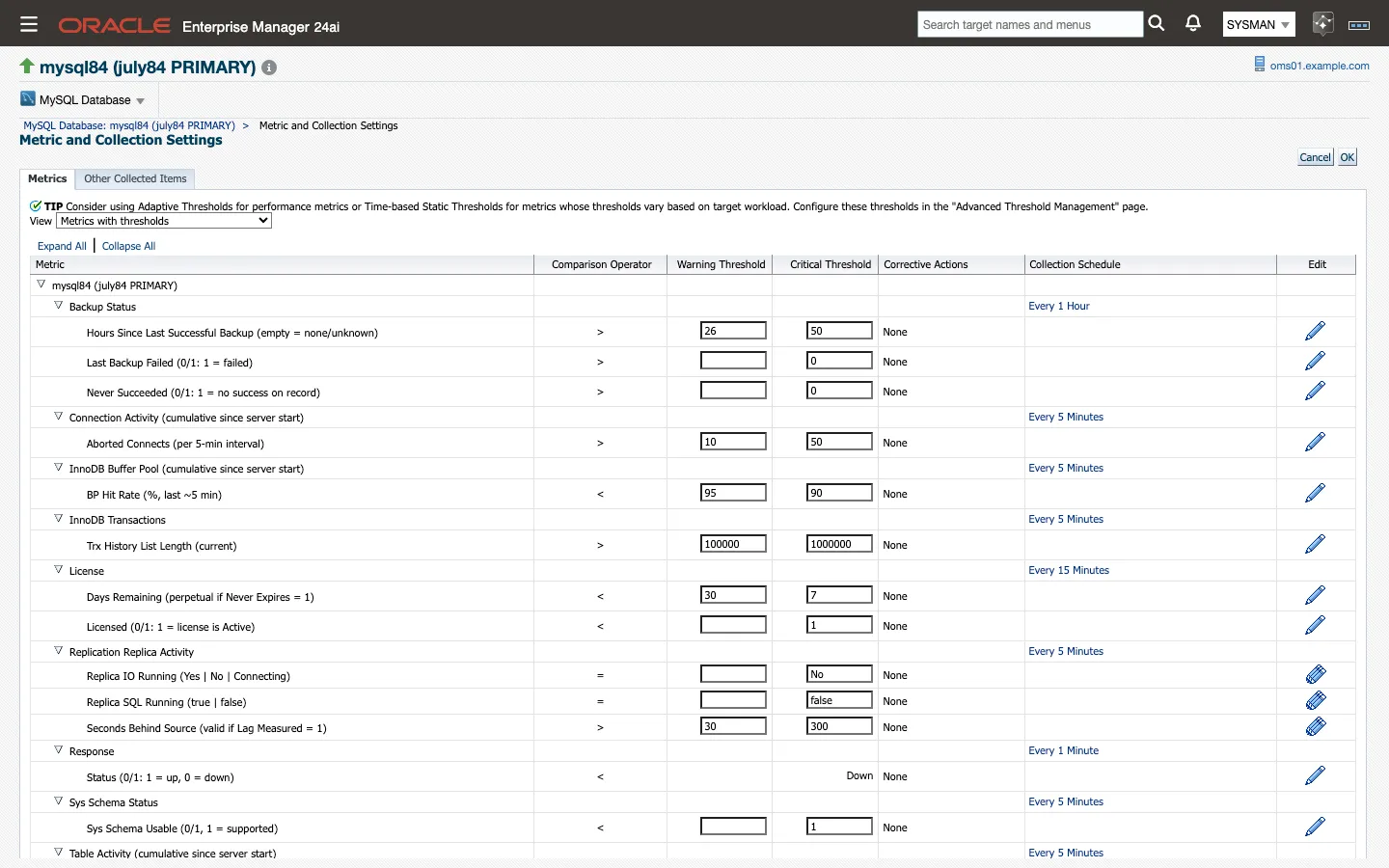
Thresholds live on the target, and you edit them from Metric and Collection Settings:
-
From the target’s home page, choose the target-type menu → Monitoring → Metric and Collection Settings.
-
Set the View list to All metrics so that columns without a current threshold are listed too.
-
Find the metric group and column. 7.1 gives both names for every shipped threshold, and the metrics reference (6.1) gives them for every other column.
-
Edit Warning Threshold and Critical Threshold on the row, or click the row’s edit icon for the full editor.
-
Set Number of Occurrences if the condition should have to hold for more than one collection before it raises an incident. Most shipped thresholds use one occurrence; the exceptions are
dr_promotion_readyandfallback_reason(two each),avg_wait_us(three) andtop_wait_class(five), for the reasons 7.1 gives. -
Click OK to save. The new value applies from the next collection.
Done when get_threshold reports the new value for the target:
emcli get_threshold -target_name="mysql84-prod-01" -target_type="ip_mysql_database"Clearing a threshold field removes the threshold: the column keeps collecting and stops alerting. The same page changes a group’s collection schedule, and can stop a group collecting altogether. Use that rather than deleting a target when you want to quiet a metric group.
Note: A threshold edited this way is an override on that one target, and applying a monitoring template to the target replaces it with the template’s value. Where a value should hold across a fleet, put it in a monitoring template (Enterprise → Monitoring → Monitoring Templates, created from a MySQL target and applied to a group) rather than editing targets one at a time and having the next template apply undo the work.