High availability
The plug-in monitors AlwaysOn availability groups and failover cluster instances, and it behaves predictably on Linux where clustering is managed outside Windows.
Prerequisites for this page
- A target pointed at an instance participating in an availability group or a failover cluster. See What to point at, which matters more here than anywhere else in the guide.
- The monitoring login present on every replica you want reported, not only the primary.
In this page: Availability groups · What to monitor · Failover readiness · Failover cluster instances · Linux and the Pacemaker boundary · Database mirroring
Availability groups
Availability groups are monitored through the availability-group metric families and the AG Failover Readiness page. Both work identically on Windows- and Linux-hosted SQL Server.
What to monitor
| Target on | You get |
|---|---|
| The listener | The primary’s view, following the primary across a failover |
| A replica | That replica’s own view, including when it is a secondary |
Monitoring the listener alone is enough to answer “is the group healthy”. Adding the replicas as targets as well tells you which replica is which, and lets you see a secondary’s own state — worth doing for a disaster-recovery replica you care about individually.
A standalone instance simply returns no availability-group rows. There is no separate configuration and no error.
Failover readiness
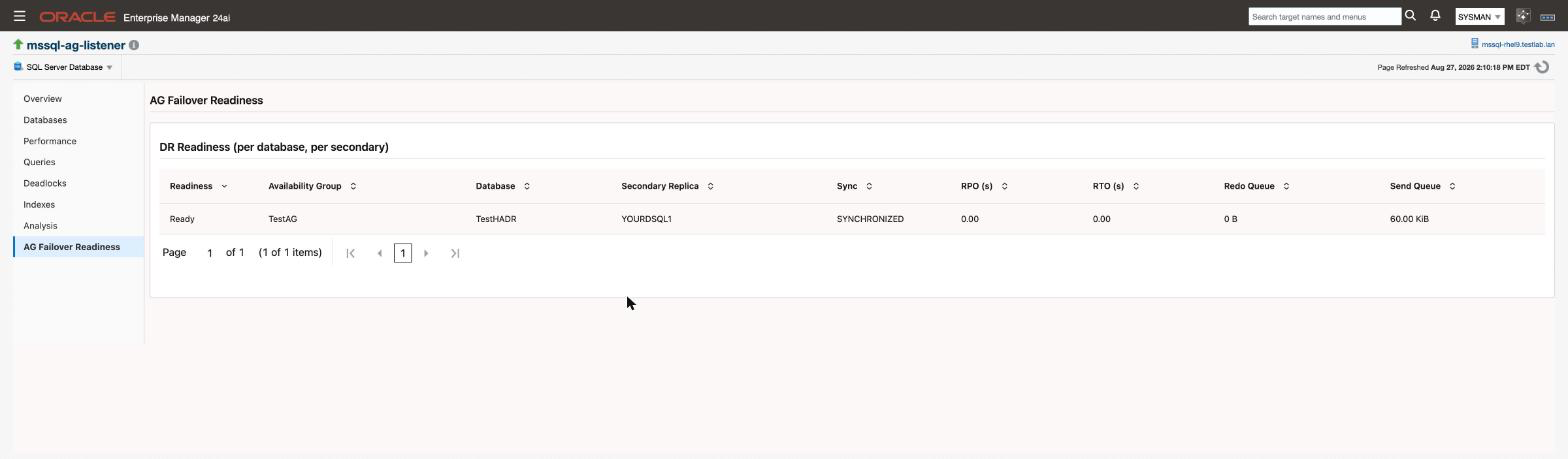
The point of the readiness surface is to answer a question the built-in dashboards do not: if I failed over right now, what would it cost me?
For each database and secondary it reports the synchronisation state, the recovery point in seconds, the redo and send queue sizes, and whether the replica link is healthy — with a readiness verdict that folds those together.
Thresholds ship on the recovery point, both queue sizes and the replica link. See Alerts and thresholds.
One deliberate design point: the critical threshold sits on the replica link, not on the readiness column. A healthy asynchronous-commit disaster-recovery secondary is permanently in a synchronising state, so alerting on readiness would raise a standing critical on a perfectly correct topology. Lag magnitude is covered by the queue and recovery-point thresholds instead, which measure how far behind the replica actually is.
Failover cluster instances
On a Windows Server Failover Cluster, the plug-in reports the node list and which node currently owns the instance. Point the target at the virtual network name and it follows the instance across a failover.
Linux and the Pacemaker boundary
On Linux, SQL Server high availability is normally managed by Pacemaker rather than Windows Server Failover Clustering.
The plug-in detects this and returns an empty cluster-node table rather than an error. Windows-specific cluster detail genuinely is not available under Pacemaker, and the plug-in degrades cleanly instead of reporting a failure that would need investigating every time.
Availability groups on Linux are unaffected — they are monitored exactly as on Windows. It is only the Windows-cluster-specific detail that is absent.
If you monitor Linux-hosted SQL Server under Pacemaker, an empty cluster-node table is the expected result, not a fault.
Database mirroring
Mirroring metrics are still collected for continuity with older estates, but there is no dedicated page. Microsoft deprecated mirroring in favour of availability groups from SQL Server 2012, and new deployments should not be using it.
Related
- Monitoring pages - the AG Failover Readiness page, region by region
- Alerts and thresholds - the AG thresholds and what each one measures
- Targets and properties - listener, virtual network name, or replica
- Credentials - the login must exist on every replica, not only the primary
- Troubleshooting - an AG region that stays empty